Category:
Analytics
Client:
Reliance Industries Limited
Vision
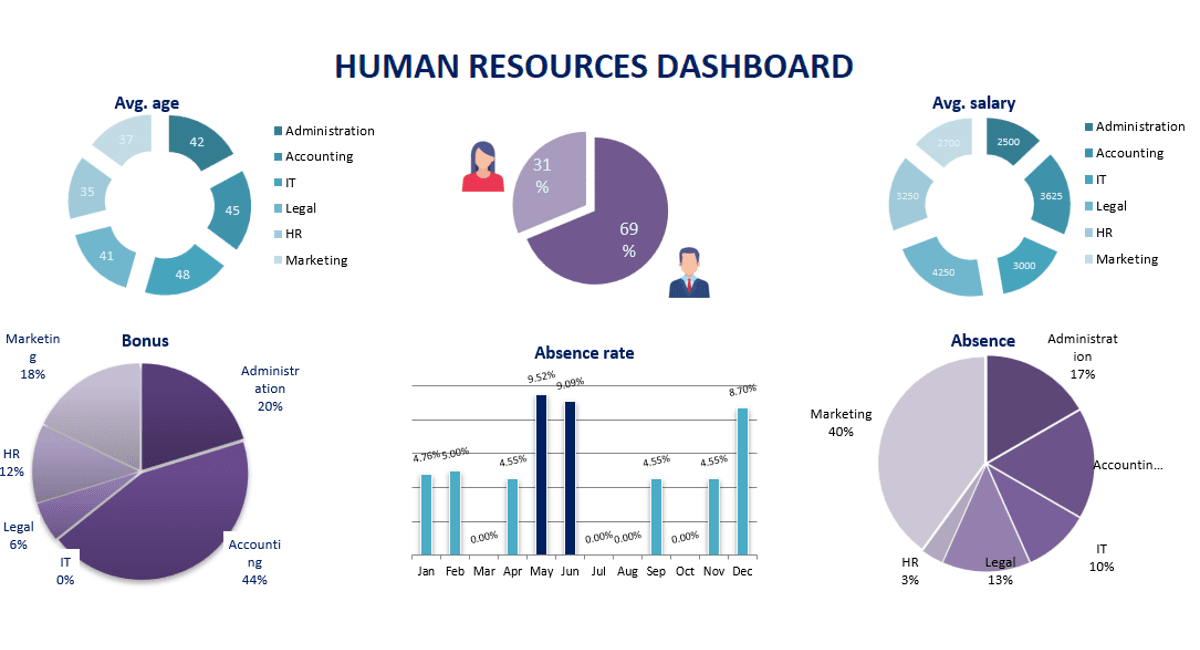
The Human Resource Information Dashboard is designed to provide an intuitive, data-driven interface that enables CHRO and apex member to visualize, analyze, and generate reports on key HR metrics. By tightly integrating with SAP-HR (PA/PY/PT) databases, the system ensures near real-time insights into Headcount, Payroll, Time Attendance, Training, Reimbursement, Qualification, Progression, Recruitment, Attrition and other crucial HR parameters. The dashboard delivers graphical reports with drill-down capabilities (from world map -> country -> state -> city -> building -> employee), flexible query options, and functional insights to support strategic decision-making.
Approach
Requirement Analysis & Design
Identify key business and HR reporting needs.
Define data extraction, transformation, and visualization strategies.
Select appropriate BI tools (e.g., Power BI, Tableau, Inhouse developed tool).
Develop a secure integration layer for SAP-HR data access.
Development & Implementation
Database Integration: Extract, process, and structure data from SAP-HR PA (Personnel Administration), PY (Payroll), and PT (Time Management).
Real-Time Reporting: Enable dynamic, drill-down graphical reports.
Query Flexibility: Allow HR teams to create custom queries and filters.
Security & Access Control: Implement role-based access ensuring data privacy.
Performance Optimization: Ensure fast report generation through caching, indexing, and query optimization.
Deployment & Optimization
Conduct UAT (User Acceptance Testing) with HR teams.
Optimize dashboard performance, accessibility, and user experience.
Provide documentation and training sessions for HR teams.
Monitor system performance and introduce enhancements.
Challenges & Complex Problems
Data Complexity & Integration
Handling structured & unstructured data from SAP-HR PA, PY, PT modules.
Ensuring data consistency, accuracy, and synchronization.
Performance Bottlenecks
Managing large datasets for real-time reporting without system lag.
Optimizing query execution for drill-down and multi-level analysis.
User-Centric Accessibility
Designing an intuitive interface for non-technical HR users.
Ensuring compatibility with mobile, web, and tablet interfaces.
Solutions & Best Practices
Data Warehouse Implementation:
Establish an optimized data warehouse to handle historical and real-time HR data.
BI & Visualization Tools:
Leverage tools like Power BI, Tableau, or SAP Fiori/UI5 for enhanced visualization.
Query Optimization:
Utilize data caching, indexing, and pre-aggregated tables to boost report performance.
Security & Role-Based Access:
Implement RBAC (Role-Based Access Control) and Single Sign-On (SSO).
User-Centric Design, Accessibility & Optimization
Interactive UX/UI:
Design an intuitive, visually engaging interface for HR professionals.
Multi-Platform Accessibility:
Ensure compatibility with mobile, desktop, and cloud-based platforms.
Performance Enhancements:
Use distributed computing, caching, and data compression techniques.
Technologies Used
Dot Net
MS SQL Server
Third Party Libraries
SAP ECC 6.0
Conclusion
The HR Information Dashboard provides data-driven insights that empower HR teams to make informed decisions. By integrating with SAP-HR, the platform delivers real-time, interactive reports with deep analytical capabilities. With security, scalability, and user experience at its core, the system enhances workforce management and strategic HR planning.